Data Directories
The Optional header ends with an array of 16 IMAGE_DATA_DIRECTORY entries, each an RVA and a size, that point to the file's important tables. Each directory has its own page:
| # | Directory | What it holds | CLI | GUI node |
|---|---|---|---|---|
| 0 | Export | Functions a DLL exposes, forwarders | --exports | DIR_ENTRY_EXPORT |
| 1 | Import | DLLs and functions the file needs | --imports | DIR_ENTRY_IMPORT |
| 2 | Resource | Icons, version info, manifests, payloads | --resources | DIR_ENTRY_RESOURCE |
| 3 | Exception | x64/ARM64 function table and unwind data | --exception | DIR_ENTRY_EXCEPTION |
| 4 | Security | Authenticode signatures (file offset, not RVA) | --security | DIR_ENTRY_SECURITY |
| 5 | Base relocation | Fix-ups for loading at another base; rebase preview | --basereloc | DIR_ENTRY_BASERELOC |
| 6 | Debug | PDB path, POGO, repro | --debug | DIR_ENTRY_DEBUG |
| 7 | Architecture | Reserved, must be zero | --dirs | Data Directories |
| 8 | Global pointer | GP register value (MIPS/IA-64) | --dirs | Data Directories |
| 9 | TLS | Thread-local storage and callbacks | --tls | DIR_ENTRY_TLS |
| 10 | Load config | CFG, SafeSEH, security cookie | --loadconfig | DIR_ENTRY_LOAD_CONFIG |
| 11 | Bound import | Pre-resolved import timestamps | --bound-imports | DIR_ENTRY_BOUND_IMPORT |
| 12 | IAT | Import address table | --dirs, --imports | Data Directories / Import FT |
| 13 | Delay import | Imports loaded on first call | --delay-imports | DIR_ENTRY_DELAY_IMPORT |
| 14 | COM descriptor | .NET CLR header and metadata | --net | DIR_ENTRY_COM_DESCRIPTOR |
| 15 | Reserved | Must be zero | --dirs | Data Directories |
Tip
ppee-cli --dirs prints the whole table; Optional Header → Data Directories shows it in the GUI. Architecture (7) and Reserved (15) must be zero, and Global Pointer (8) must have size 0. In the GUI a violation is marked as an error in the Data Directories list, so it stands out; in JSON, compare DataDirectory[7|8|15] yourself.
Windows screenshot: The Data Directories list: each directory's RVA, size and the section it lands in, with empty directories greyed out
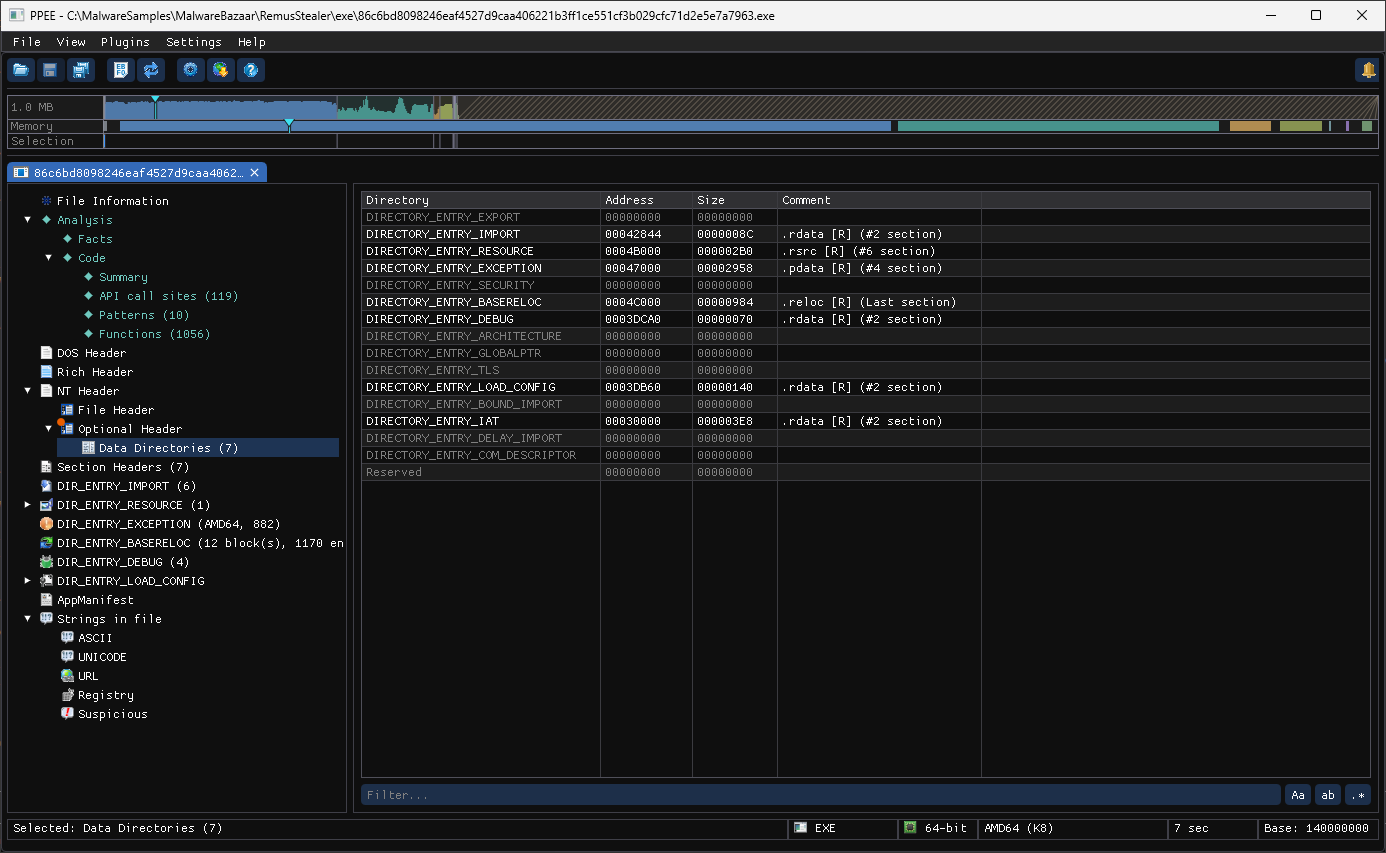
Optional Header → Data Directories for a shellcode loader (86c6bd80….exe). Seven directories are present, each with the section it lands in; the empty ones are greyed out. No Security entry means the file is unsigned, and no TLS means nothing runs before the entry point, so steps 1 and 3 of the triage below are already answered.
A triage order for unknown samples
| Step | Directory | Question it answers |
|---|---|---|
| 1 | Security | Signed? By whom? Modified after signing? |
| 2 | Import + Delay Import | What can it do? Is it packed (tiny import table)? |
| 3 | TLS | Does code run before the entry point? |
| 4 | Resource | Embedded payloads, fake version info, lure icons? |
| 5 | COM Descriptor | Is it .NET? Obfuscated? Mixed-mode? |
| 6 | Export | How is a DLL started? Sideloading or proxying? |
| 7 | Debug | PDB path for attribution; stripped? |
| 8 | Load Config + Exception | Real compiler output, or protector-damaged tables? |
| 9 | Base Relocation | ASLR-capable? Dump or rebase analysis |
The same data is available to scripts (ppee-cli --json) and to AI assistants (MCP), so this order can be automated. See the CI policy gates for a ready-made example.
References
- Microsoft PE format specification, data directories: the 16 directory entries and what each points to.