Bound Import Directory
Data directory 11
IMAGE_DIRECTORY_ENTRY_BOUND_IMPORT: DataDirectory[11] in the Optional header. All data directories
Binding is a legacy load-time optimization: a tool (bind.exe, or the Windows setup process) resolves the imports in advance and writes the real function addresses into the IAT on disk. The bound import directory records which DLL versions those addresses came from, identified by their timestamps. At load time, if every listed DLL still has the same timestamp and loads at its preferred base, the loader skips resolution. Otherwise it resolves the imports normally.
ASLR made binding mostly useless, so it's rare in modern software. When it's there, it's a useful dating and provenance clue.
How the structure works
IMAGE_BOUND_IMPORT_DESCRIPTOR  { TimeDateStamp, OffsetModuleName, NumberOfModuleForwarderRefs }
    IMAGE_BOUND_FORWARDER_REF  { TimeDateStamp, OffsetModuleName, Reserved }   × NumberOfModuleForwarderRefs
... next descriptor ...
all-zero terminator
OffsetModuleNameis relative to the start of the bound import directory, not an RVA.- Forwarder refs list DLLs that a bound DLL forwards to, for example
KERNEL32.dll → NTDLL.DLL, because those timestamps must match too. - The matching import descriptors have
TimeDateStamp = FFFFFFFF("bound, see the bound import directory"). - The directory normally sits in the header area, after the section table, so it's mapped even though it belongs to no section.
What PPEE shows
- Upper list, one row per bound DLL: NameOffset · Name · #Forwarders · TimeDateStamp · Comment (the timestamp as a date) · Description.
- Lower list: the forwarder references of the selected DLL (NameOffset · Name · Reserved · TimeDateStamp · Comment).
- Tree: DIR_ENTRY_BOUND_IMPORT (n). Follow in Hex View (Ctrl+H) and editing work on every cell.
Windows screenshot: Bound imports of a rogue antivirus: user32, MSVBVM60 and kernel32 with 2008–2009 timestamps, and kernel32's forwarder to NTDLL
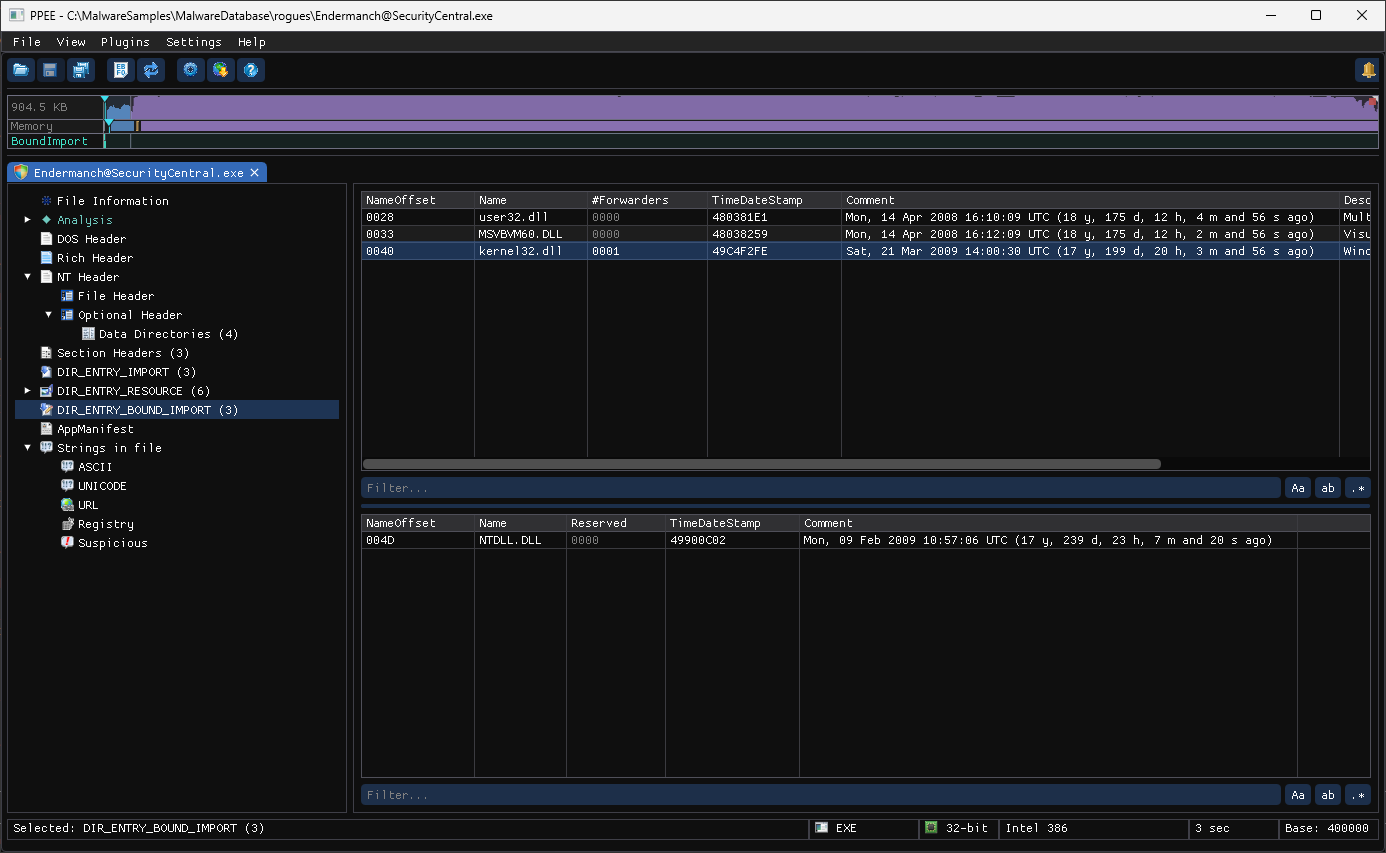
A Visual Basic 6 rogue antivirus ([email protected]) is bound against user32.dll, MSVBVM60.DLL and kernel32.dll. The Comment column turns each timestamp into a date: April 2008 and March 2009, the Windows XP SP3 era, so it was bound on a machine of that time. Selecting kernel32.dll lists its forwarder reference, NTDLL.DLL, in the lower list.
Reading bound imports like an analyst
| Observation | What it suggests |
|---|---|
| Bound DLL timestamps from a specific date range | The Windows build the file was bound against: shipped with, or installed on, that version. Useful for dating OS components and old installers |
| Bound imports on a file that claims to be recent | The file was bound on an old system, or its components were taken from old media |
| Bound imports in a third-party DLL | Old build tooling, or a file re-bound on a specific machine (which also changed its IAT bytes, and therefore its hash) |
| Directory outside the header area or overlapping other data | Hand-edited or malformed: a parser-confusion trick |
OffsetModuleName pointing outside the directory, or huge forwarder counts | Malformed: crafted to crash or mislead analysis tools |
Import descriptors with TimeDateStamp = FFFFFFFF but no bound import directory | The IAT may contain stale absolute addresses. Treat them as untrusted |
Real sample: a Windows component
$ ppee-cli --bound-imports wab.exe
Bound imports (8 module(s)):
  ADVAPI32.dll (TimeDateStamp=4CE7C455) - 0 forwarder(s)
  KERNEL32.dll (TimeDateStamp=4CE7C78B) - 1 forwarder(s)
    -> NTDLL.DLL
  GDI32.dll (TimeDateStamp=4CE7C651) - 0 forwarder(s)
  USER32.dll (TimeDateStamp=4CE7C9F1) - 1 forwarder(s)
    -> NTDLL.DLL
2C0 (size BC), inside the 0x400-byte header area, and every import descriptor has TimeDateStamp = FFFFFFFF. The bound KERNEL32.dll timestamp 4CE7C78B is 2010-11-20, the Windows 7 SP1 build era, so the file was bound against Windows 7 SP1 system DLLs. CLI and JSON
JSON: boundImports[] → name, timeDateStamp, forwarders[] (name, timeDateStamp).
# Bound DLLs with human-readable dates
ppee-cli --json --bound-imports f.exe | jq -r '.boundImports[] | "\(.name)\t\(.timeDateStamp)"' | while IFS=$'\t' read -r n t; do
  printf '%-16s %s  %s\n' "$n" "$t" "$(date -u -d @$((16#$t)) +%F)"; done

# Is the image bound? (import descriptors marked FFFFFFFF)
ppee-cli --json --imports f.exe | jq '[.imports[].timeDateStamp] | any(. == "FFFFFFFF")'
Related: --bound-imports · Import directory · Headers (timestamps)
References
- Microsoft PE format specification, data directories: where the bound import entry sits among the directories.