Delay-Load Import Directory
Data directory 13
IMAGE_DIRECTORY_ENTRY_DELAY_IMPORT: DataDirectory[13] in the Optional header. All data directories
Delay-loaded DLLs aren't mapped when the process starts. The linker (/DELAYLOAD:x.dll) generates a small helper (__delayLoadHelper2), and the first call to one of the DLL's functions loads the DLL and patches that IAT slot. Two consequences matter for analysis:
- Capabilities hide here. Tools and analysts that only read the normal import table miss them. A binary can look harmless in its static imports while delay-loading
WININET.dllorCRYPT32.dll. - A missing delay-loaded DLL doesn't stop the program from starting. It only fails when the code path runs. If the DLL doesn't exist on the system, anyone who can write to a directory in the search order can supply it: phantom DLL hijacking.
How the structure works
ImgDelayDescr (one per DLL, zero-terminated):
| Field | Meaning |
|---|---|
Attributes | 1 = the fields below are RVAs (all modern linkers). 0 = old VA-based format |
DllNameRVA | The DLL name |
ModuleHandleRVA | Where the helper caches the HMODULE |
ImportAddressTableRVA (IAT) | Slots that initially point at the helper thunk, then at the real function |
ImportNameTableRVA (INT) | Hint/name or ordinal entries, like the normal import OFT |
BoundImportAddressTableRVA | Optional pre-bound addresses |
UnloadInformationTableRVA | Copy of the original IAT, used by __FUnloadDelayLoadedDLL2 |
TimeDateStamp | Bound DLL timestamp, or 0 |
What PPEE shows
- Upper list, one row per DLL: Attributes · Dll Name Addr · Dll Name · Imported functions (count with a share bar) · HMODULE Addr · IAT · INT · Bound IAT · Unload IAT · TimeDateStamp · Description (read from file).
- Lower list: the functions of the selected DLL: OFT · Hint · Name · Demangled name · Ordinal.
- On Windows, DLLs not found in the System or Windows directories are shown in the warning color. For a delay-loaded DLL that is a direct pointer to a potential phantom-DLL hijack.
- Follow in Hex View (Ctrl+H) and editing work on every cell.
Windows screenshot: Delay imports of a ransomware sample: five delay-loaded DLLs, WININET.dll selected with its HTTP and FTP functions and their call sites
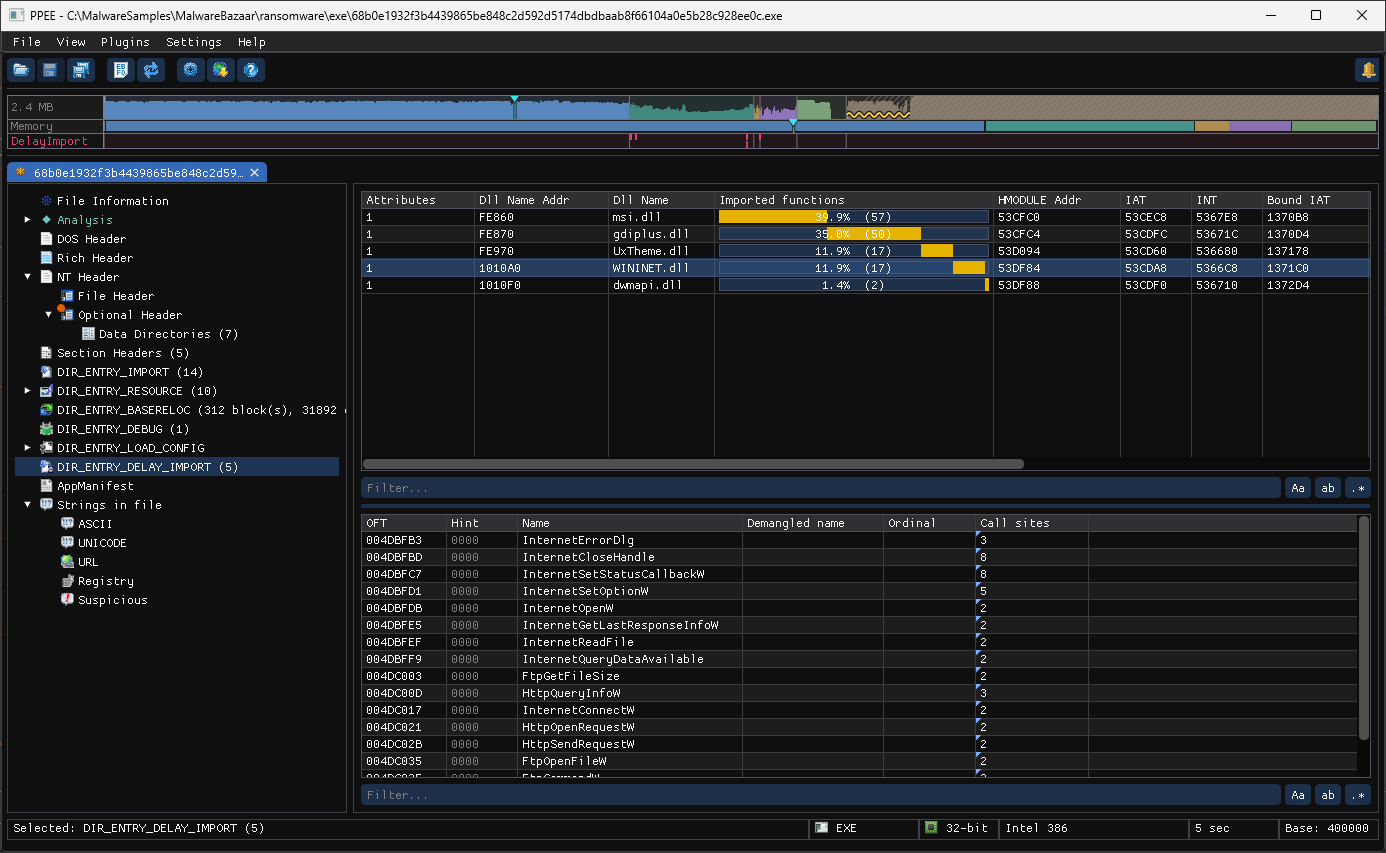
A ransomware sample (68b0e193….exe) delay-loads WININET.dll: InternetOpenW, HttpOpenRequestW, HttpSendRequestW, FtpOpenFileW and more. None of them are in its normal import table (14 DLLs, no WININET), so its network capability appears only here. The Call sites column (from the background code scan) shows that the code really calls them. msi.dll, imported by ordinal, hints at an installer-based builder.
Reading delay-load imports like an analyst
| Observation | What it suggests |
|---|---|
| Network, crypto or injection APIs only in delay imports | The interesting capability is deferred. Include delay imports in every triage |
| Delay-loaded DLL that doesn't exist on a standard Windows install | Phantom-DLL hijack opportunity (for red teams) or a sideloading target (for defenders to monitor) |
| A signed, trusted program delay-loading a DLL by a bare name | Search-order hijacking candidate when the program runs from a user-writable folder |
Attributes = 0 | Old VA-based descriptor, from a very old linker or crafted by hand |
| IAT slots that don't point at the helper thunk on disk | Patched or tampered IAT |
Real sample: explorer.exe
explorer.exe delay-loads 60 modules. Among them:
CLI and JSON
$ ppee-cli --delay-imports explorer.exe
Delay-load imports (60 module(s)):
  SndVolSSO.DLL (attrs=1) - 4 function(s)
    Ordinal #1
  WINTRUST.dll (attrs=1) - 1 function(s)
    WTGetSignatureInfo (hint=91)
JSON: delayImports[] → name, attributes, timeDateStamp, functions[] (hint + name, or ordinal).
Hunting recipes
# Complete capability picture: static + delay-loaded, tagged
ppee-cli --json --imports --delay-imports f.exe | jq -r '
  (.imports[]      | .name as $m | .functions[] | "static\t\($m)!\(.name // "#\(.ordinal)")"),
  (.delayImports[] | .name as $m | .functions[] | "delay\t\($m)!\(.name // "#\(.ordinal)")")'

# APIs that appear ONLY as delay imports
ppee-cli --json --imports --delay-imports f.exe | jq -r '
  ([.imports[].functions[].name // empty]) as $s
  | [.delayImports[].functions[].name // empty] - $s | .[]'

# Phantom-DLL candidates: delay-loaded DLLs missing from a reference System32 listing
ls /mnt/win/Windows/System32 | tr 'A-Z' 'a-z' > system32.txt
ppee-cli --json --delay-imports f.exe | jq -r '.delayImports[].name | ascii_downcase' \
  | grep -v -e '^api-ms-' -e '^ext-ms-' | grep -vxF -f system32.txt
Related: --delay-imports · Import directory · Load Config (protected delay-load IAT)
References
- Microsoft PE format specification, delay-load import tables: the delay import descriptor and its tables.
- Linker support for delay-loaded DLLs (Microsoft): how and when delay-loaded DLLs are resolved.