Strings
PPEE scans the whole file, not only the sections, so strings in the overlay and headers are found too. It reports each hit with its file offset and the section it falls in.
| Group | Contents |
|---|---|
| ASCII | Runs of printable 8-bit characters |
| UNICODE | UTF-16LE runs |
| URL | Hits that look like URLs or URL paths (ASCII or Unicode) |
| Registry | Registry paths and registry API related strings |
| Suspicious | Hits that contain a keyword from Suspicious.txt |
For x86/x64 files, each strings view gets a Referenced by column: how many instructions point at the string. A string the code uses (a registry key it opens, a URL it requests, an API name it passes to GetProcAddress) is much stronger evidence than one that only sits in the file. Click the count for the references; from the CLI use --xrefs string:TEXT, and in MCP get_strings reports codeRefs.
- .NET: Referenced by counts the IL
ldstrinstructions that load the string, so an assembly's C2 URL or registry key shows whether code uses it. - Go and Rust store string literals back to back with no terminator. PPEE cuts them where the code refers to each one and at the length the code passes, so every literal is its own row (
C:\ProgramData\AfroRat\config.bin, not glued to the next string).
The minimum and maximum lengths are set in Settings → General (defaults 2 and 32768).
Suspicious strings
Suspicious.txt sits next to the executables and ships with about 390 keywords: virtualization and sandbox artifacts (VMXh, Xen, vbox), analysis tools, AV process names, and anti-debugging APIs. Its format:
/// Comments start with // or ///
[InterestingStrings]
// Common strings
Active-X
VMXh
%temp%
taskmgr
- Blank lines,
[section]headers and//comments are ignored. Every other line is a keyword. - Matching is a case-sensitive substring match against the first 20,000 ASCII and the first 20,000 Unicode hits, in file order (the bound that keeps a scan of a large file quick). When a file has more,
--stringssays so after the Suspicious count, and MCP'sget_stringsaddssuspiciousNote(when the suspicious group is asked for); look for a keyword in all strings withcontains. WithoutSuspicious.txtnext to the executable, the group is empty and the output says that too. - Add your own IOCs, one per line. The GUI and CLI pick them up on the next scan.
Windows screenshot: Suspicious strings of a shellcode loader: a temp-folder wipe, a self-delete ping, notepad.exe and a PDB path
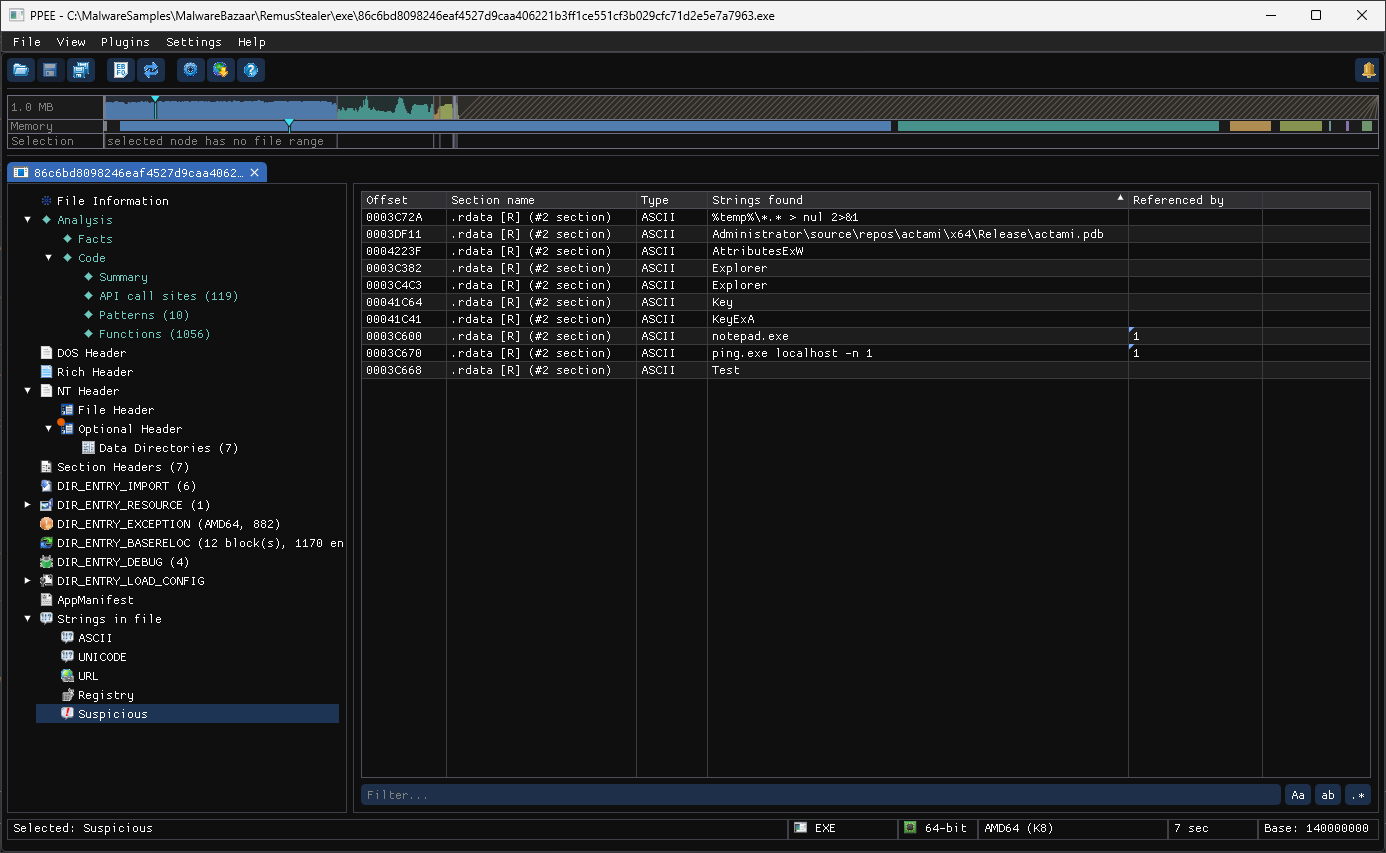
The Suspicious group of a shellcode loader (86c6bd80….exe, from a RemusStealer set) reads like a to-do list: %temp%\*.* > nul 2>&1 (wipe the temp folder), ping.exe localhost -n 1 (the usual delay before a file deletes itself) and notepad.exe, which the code uses (Referenced by 1), likely as a process to start or inject into. The build's PDB path, C:\Users\Administrator\source\repos\actami\…, matches a keyword too and lands in the list.
CLI
Sorted by default, and current settings
In the GUI, the URL, Registry and Suspicious lists are sorted by their text column by default, so similar strings sit together. Strings are scanned the first time you open Strings in file, using the length limits in Settings at that moment, so a change made in Settings applies to tabs that are already open.
ppee-cli --strings f.exe                                   # everything (large!)
ppee-cli --json --strings f.exe | jq -r '.strings.url[].text' | sort -u
ppee-cli --json --strings f.exe | jq -r '.strings.suspicious[] | "\(.offset)\t\(.text)"'
Big files
A DLL can produce tens of thousands of strings. Filter the output with jq, or use the MCP get_strings tool, which filters by length and substring and limits each group.
References
- MITRE ATT&CK: a catalogue of attacker techniques, useful for naming what suspicious strings point to.