A NativeAOT ransomware that forgot its own key
At a glance
- Sample
d13377117414e8e18498f5338e8b3474f8ec78729bf4dc880808824b0cec41a2.exe(2.2 MB, PE32+ x64, unsigned)- Question
- It has no CLR header, so a .NET decompiler can't open it. What does it do, and can its victims get their files back?
- You'll use
- NativeAOT analysis · Strings · Manifest · Debug directory
- Time
- about 5 minutes, nothing executed
C# ransomware is often compiled with NativeAOT so that it ships as plain native code. The trick hides it from .NET tools, but not from PPEE: as long as the runtime's module header is there, the method names come back.
Step 1 Recognize the runtime
Open the file. The Analysis node lists NativeAOT; select Analysis → NativeAOT → Summary.
Windows screenshot: NativeAOT Summary: .NET 10, entry assembly NoMatter, 15 assemblies and 4259 named methods
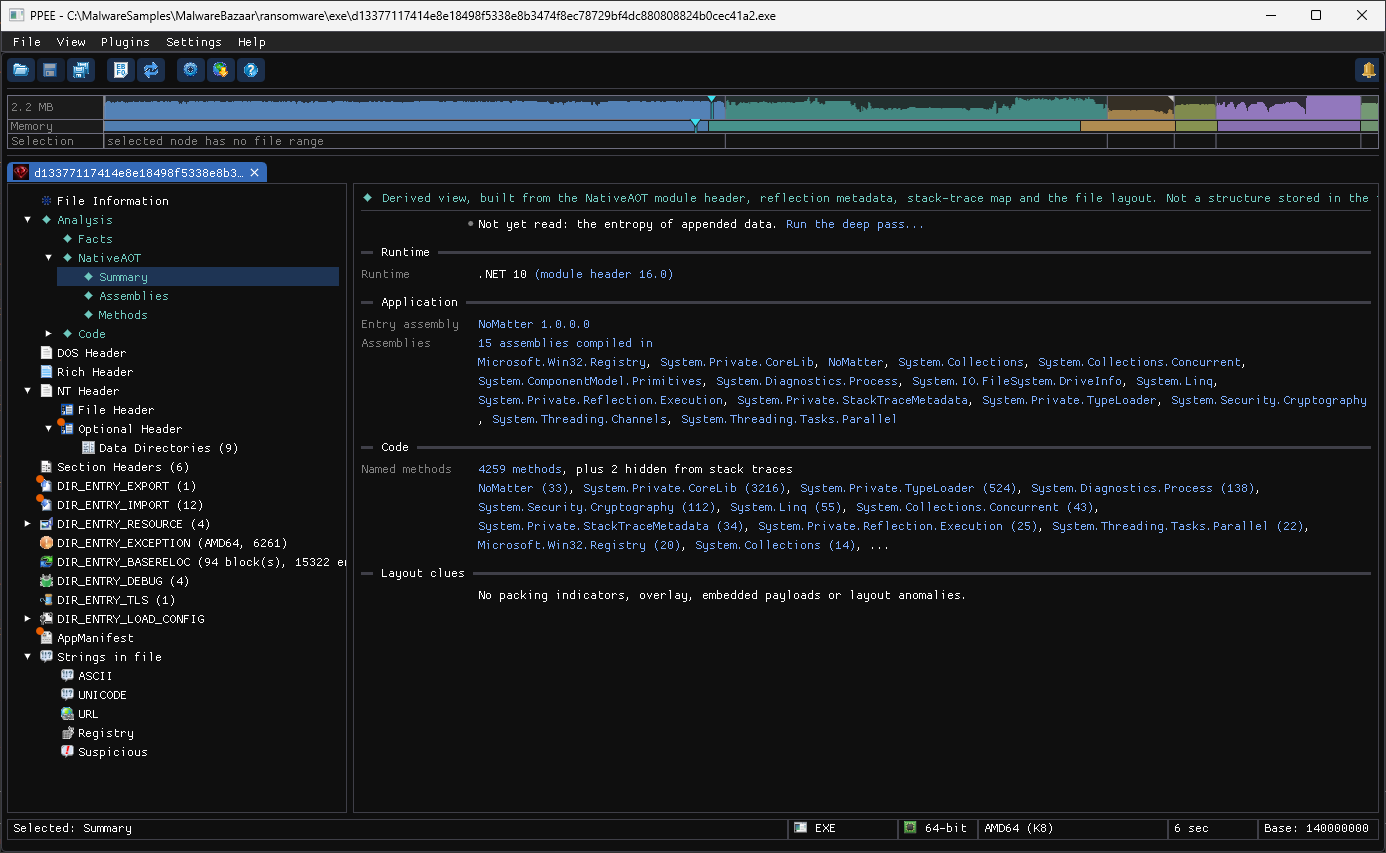
- Runtime: .NET 10 (module header 16.0): the header is intact, so the metadata can be read.
- Entry assembly:
NoMatter 1.0.0.0: the program's own name. - 15 assemblies compiled in. The list is already a capability list:
System.Security.Cryptography,System.IO.FileSystem.DriveInfo(walk every drive),System.Diagnostics.Process(start programs),Microsoft.Win32.Registry. - 4,259 named methods, 33 of them in
NoMatteritself.
$ ppee-cli --analysis d1337711….exe
NativeAOT > Summary  (built from the NativeAOT module header, reflection metadata, stack-trace map and the file layout)
Runtime
  Runtime: .NET 10 (module header 16.0) [offset 0x187D10]
Application
  Entry assembly: NoMatter 1.0.0.0
  Assemblies: 15 assemblies compiled in [Analysis > NativeAOT > Assemblies]
  Microsoft.Win32.Registry, System.Private.CoreLib, NoMatter, …, System.IO.FileSystem.DriveInfo, …, System.Security.Cryptography, …
Code
  Named methods: 4259 methods [Analysis > NativeAOT > Methods], plus 2 hidden from stack traces
The export table agrees: its only export is DotNetRuntimeDebugHeader, which every NativeAOT executable has.
Step 2 Read the author's own method names
Select Analysis → NativeAOT → Methods. The program's assembly is listed first.
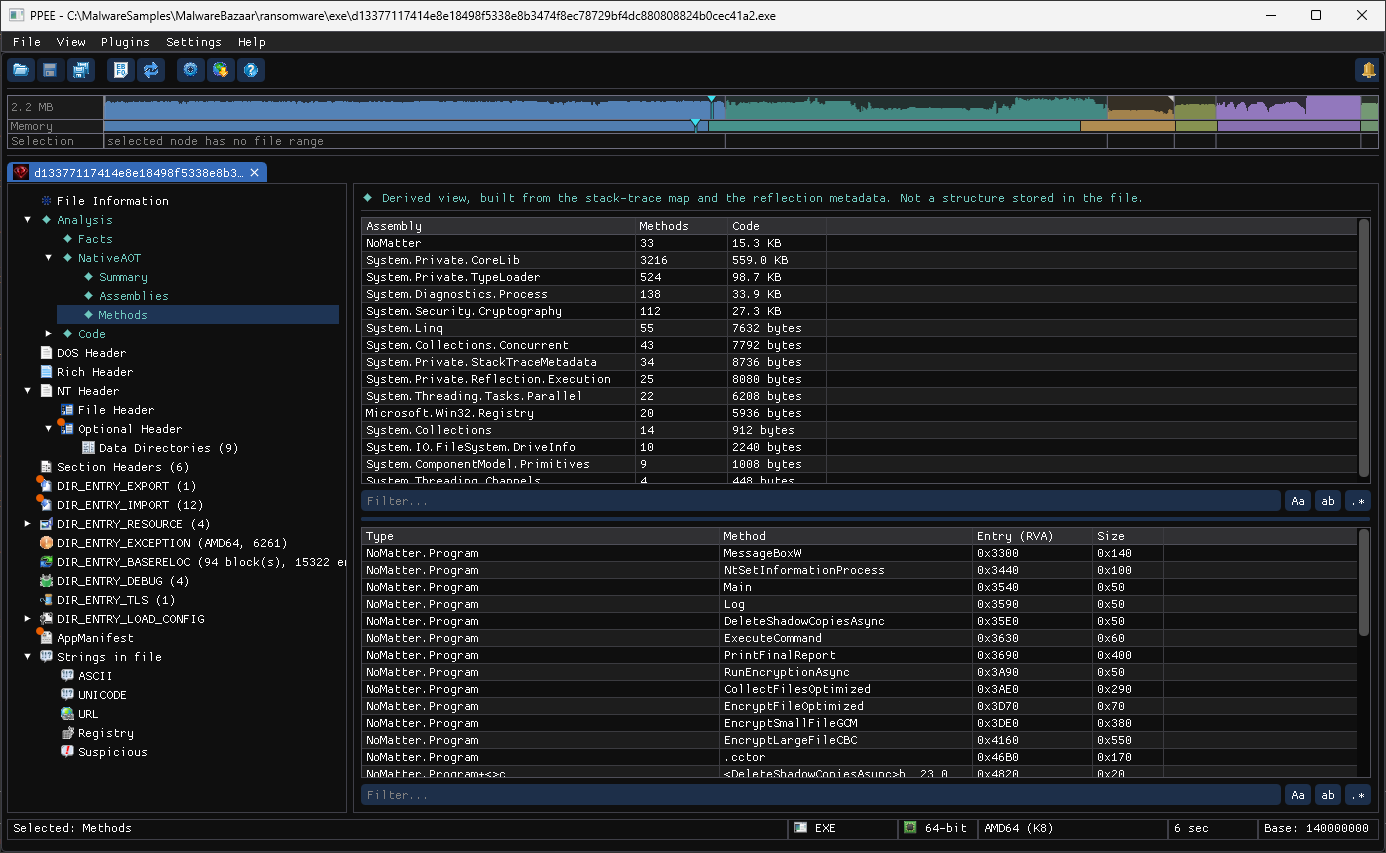
Windows screenshot: NativeAOT Methods: DeleteShadowCopiesAsync, CollectFilesOptimized, EncryptSmallFileGCM and EncryptLargeFileCBC
| Method | Says |
|---|---|
DeleteShadowCopiesAsync | Removes Volume Shadow Copies, the first thing ransomware does |
CollectFilesOptimized | Builds the list of files to encrypt |
EncryptSmallFileGCM / EncryptLargeFileCBC | AES-GCM for small files, AES-CBC for large ones |
RunEncryptionAsync, PrintFinalReport | The main loop and its summary |
NtSetInformationProcess | A P/Invoke to the native API, commonly used to mark a process critical |
Right-click any row → Show Code to read the method in the Code window.
Step 3 Confirm with the strings
Open Strings in file → UNICODE, switch on the regex button (.*) and filter for shadow|recoveryenabled|SystemRestore|oopss|vssadmin|bcdedit|wbadmin|wmic.exe|were encrypted|NoMatter.log:
Windows screenshot: UNICODE strings filtered: vssadmin delete shadows, wmic SystemRestore Disable, bcdedit recoveryenabled no, and the ransom note
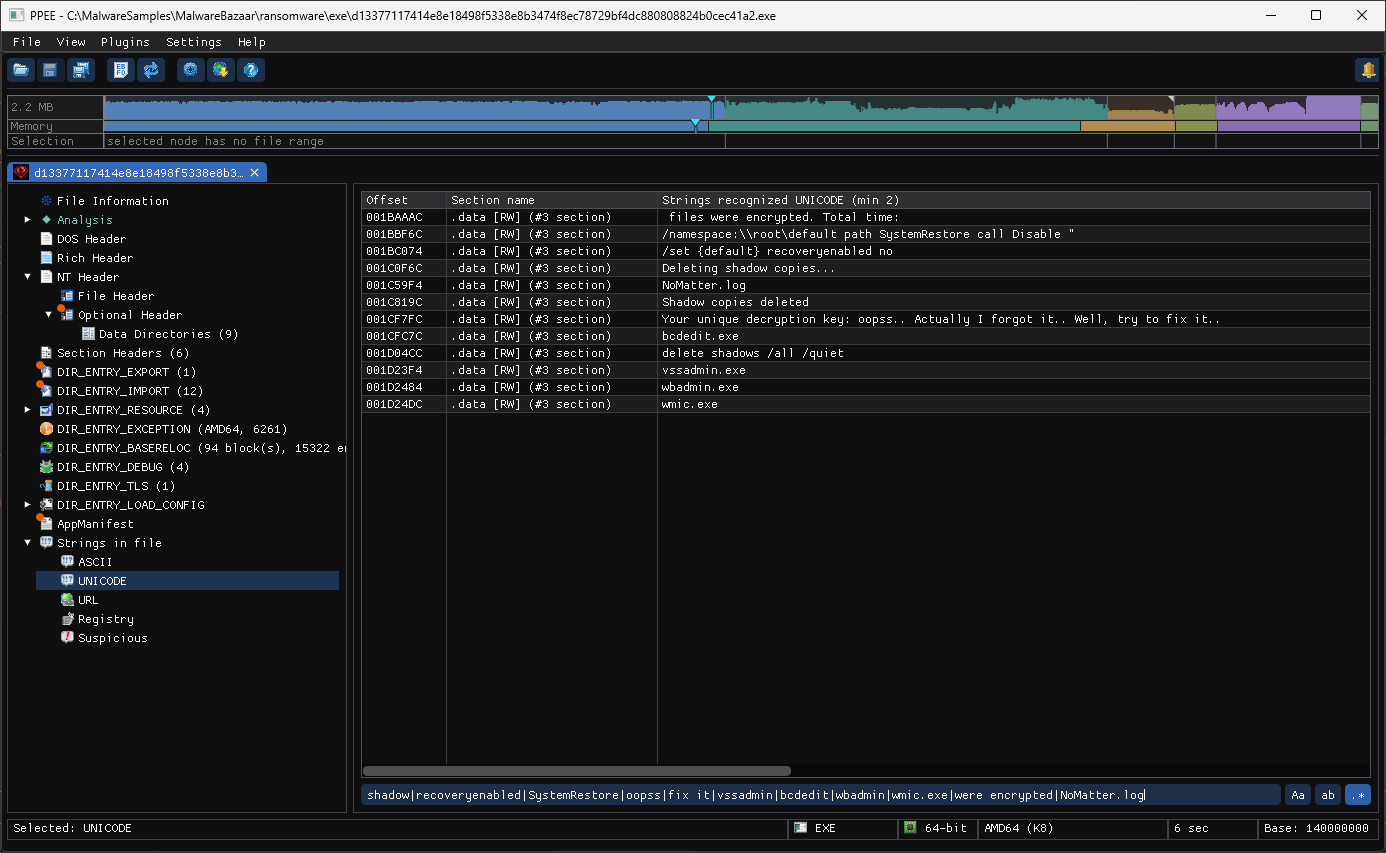
The whole recovery-killing chain sits in .data as .NET string literals:
vssadmin.exe+delete shadows /all /quiet: delete every shadow copy.wmic.exe+/namespace:\\root\default path SystemRestore call Disable: turn System Restore off.bcdedit.exe+/set {default} recoveryenabled no: disable Windows Recovery.wbadmin.exe: the backup catalog is a target too.Deleting shadow copies...,Shadow copies deleted,files were encrypted. Total time:and a log file,NoMatter.log.
$ ppee-cli --json --strings d1337711….exe | jq -r '.strings.unicode[].text' \
    | grep -E 'shadow|recoveryenabled|SystemRestore|forgot|vssadmin|bcdedit|wbadmin|wmic'
/namespace:\\root\default path SystemRestore call Disable "
/set {default} recoveryenabled no
Deleting shadow copies...
Shadow copies deleted
Your unique decryption key: oopss.. Actually I forgot it.. Well, try to fix it..
bcdedit.exe
delete shadows /all /quiet
vssadmin.exe
wbadmin.exe
wmic.exe
And the ransom note's key line:
Your unique decryption key: oopss.. Actually I forgot it.. Well, try to fix it..
There is no key. Its imports make that plausible: BCryptGenRandom, BCryptImportKey and BCryptEncrypt (from bcrypt.dll), but no network API in the imports and no System.Net assembly among the 15 compiled in, so no key is sent anywhere to be kept. Treat it as a wiper: paying gets nothing back.
Step 4 Check what it asks Windows for
Select AppManifest.
Windows screenshot: Application manifest requesting requireAdministrator
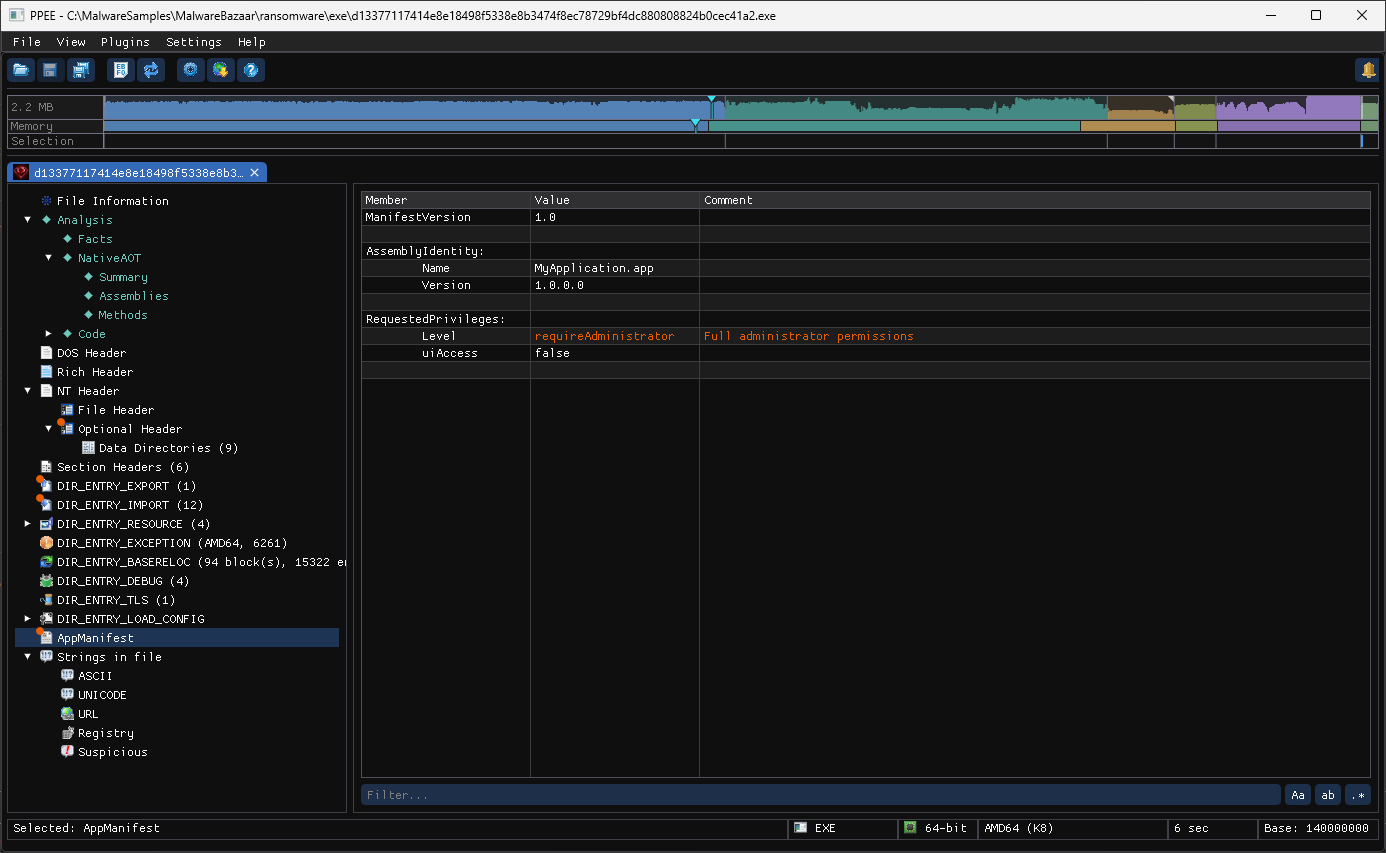
requireAdministrator is in the warning color. The program needs those rights to delete shadow copies and change the boot configuration, so it asks for them up front and relies on the user clicking Yes at the UAC prompt.
Step 5 Collect indicators for attribution
DIR_ENTRY_DEBUG gives the build path:
The project name, the target (net10.0, win-x64, native = NativeAOT) and age 6: built six times into this folder. The URL strings also hold a GitHub address that names the same project. Together with the SHA-256 and the ImpHash 0BC8AC4B767471DDD4459F0E8A39EE7A, those are what to search for.
Verdict
A C# ransomware compiled with NativeAOT to escape .NET tooling. It deletes shadow copies, disables System Restore and Windows Recovery, encrypts files with AES-GCM/CBC through BCrypt, asks for administrator rights, and keeps no decryption key, so it behaves as a wiper. Everything above came from the file at rest.
Ask an assistant
With the MCP server connected: "Triage d1337711….exe: which runtime, what do its own methods do, and which commands does it run?" The assistant uses triage_pe, the analysis section of analyze_pe and get_strings for the same steps.
More walkthroughs: all walkthroughs · A DLL that is only a payload
References
- Native AOT deployment (Microsoft .NET): how .NET apps are compiled ahead of time into native code.
- MITRE ATT&CK T1486: Data Encrypted for Impact: the file encryption.
- MITRE ATT&CK T1490: Inhibit System Recovery: deleting shadow copies and turning off recovery.